
Run a Routine step by step
The player goes one step at a time. The person presses Finished to move on.
Updated 1 min readWeb, iPhone, iPad and Android
Run the Routine
Step 1: Open the Routine
Open it from Journeys, or press Finish on the review screen right after you make it. It opens in the player.
Step 2: Press Start routine
The active step shows its picture and its line of guidance. Finished steps and the steps still to come show as smaller rows.
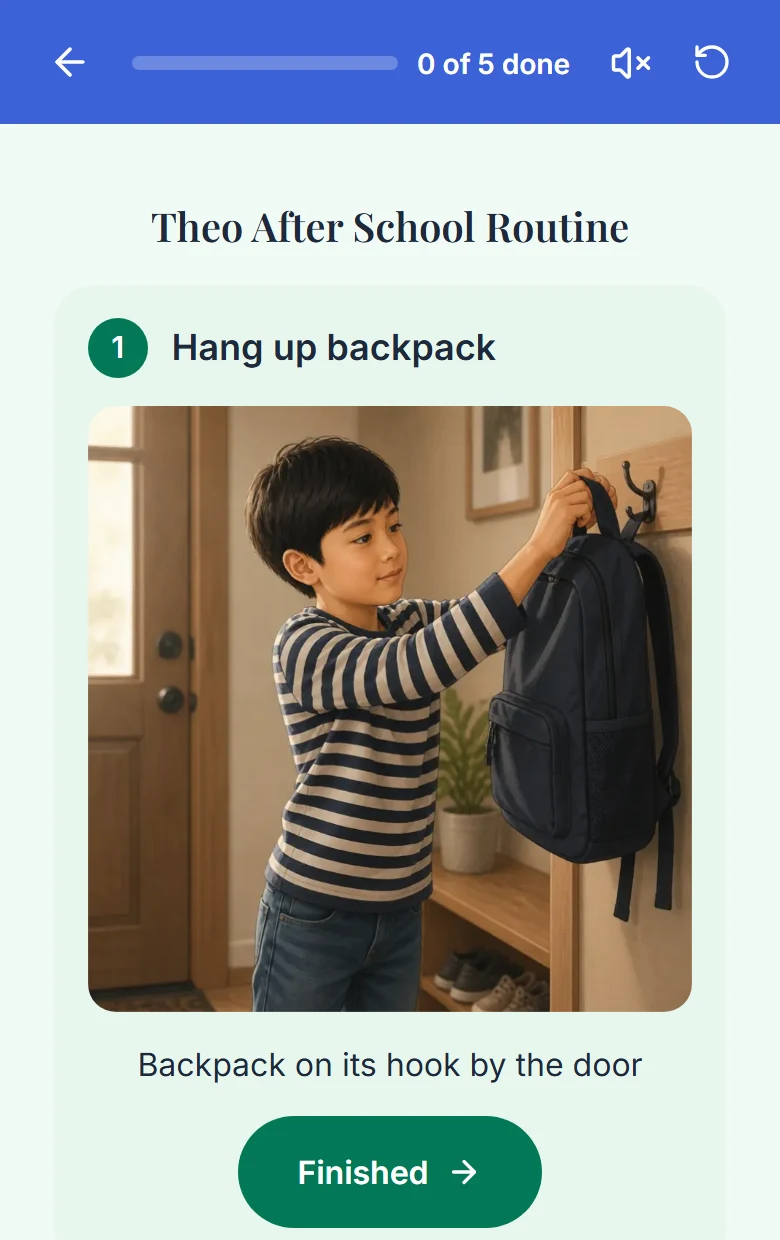
The active step, with a Finished button. Step 3: Press Finished after each step
A progress bar tracks how far along the person is. Nothing moves on by itself. There is no auto-advance and no alarm.
Step 4: Finish the last step
A celebration plays with the person's avatar.
Who reads the steps
The voice that person is set to. Six default voices come with every plan, and you pick one per person in Personalization. Marisol reads until someone chooses differently. You can turn the voice off in the middle of a run. A Routine made with the voice off can still be read aloud: turn the voice on in the player before you press Start routine.
If something goes wrong
That is expected. Reopening a completed step un-completes it and every step after it. To move forward, use the Finished button on the active step.
The Finished button turns back on after two seconds, so a stuck voice never blocks the person. You can also turn the voice off.
In a web browser, going Back or Forward can bring the player page back from memory. When that happens the run resets to the first step.
Did this answer your question?
Still stuck?
Contact support and a person will answer.