
Build today's plan
The Daily Plan is today's list of Stories, Routines and Token Boards for one person. You build it from things you already made.
Updated 2 min readWeb, iPhone, iPad and Android
On this page
Before you start
- The Daily Plan needs Premium or GentleVoice. On the free plan the Daily Plan card invites you to upgrade.
- You need at least one Story, Routine or Token Board. The plan schedules what you have. It does not create anything.
Build the plan
Step 1: Find the Daily Plan card
It is on the dashboard, and on the Dashboard tab in the app, headed with the person's name and Daily Plan. With nothing planned it says "No plan for today yet."
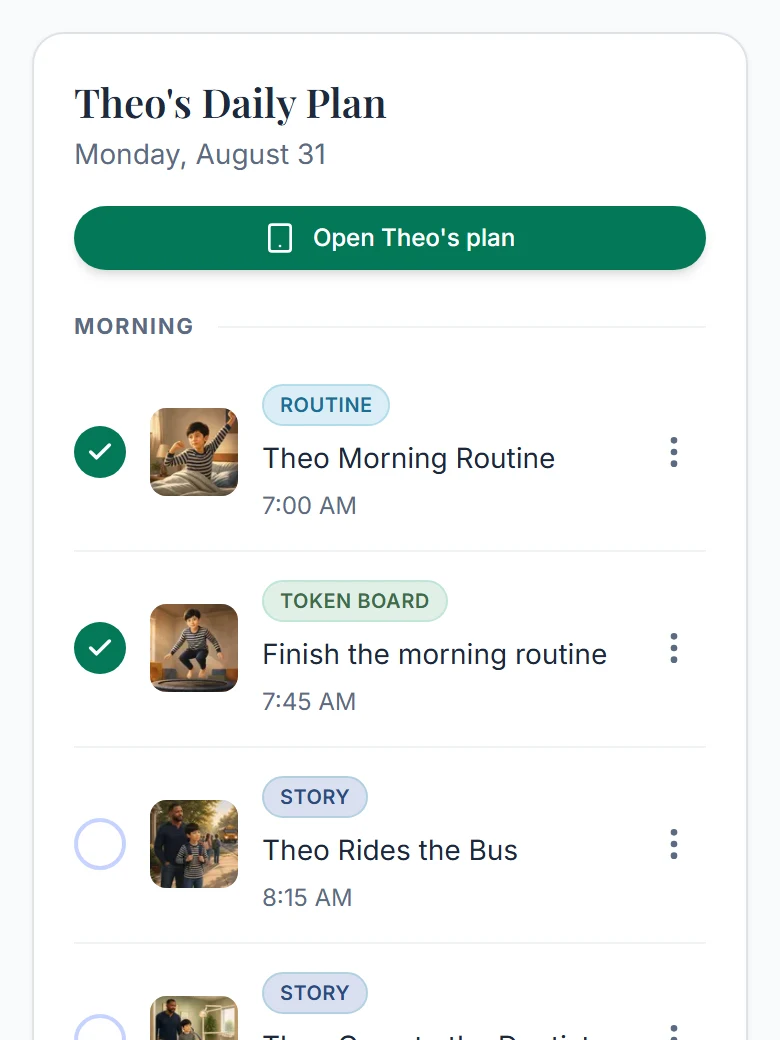
The Daily Plan card with a morning planned. Step 2: Select Add journey
Pick from your library with the type filters and search, or jump out to make something new.
Step 3: Choose when it appears
Pick Just today, Every day or Specific days. Specific days starts with Monday to Friday selected. Then set a time, or choose No set time, which shows as Anytime. A summary line states the result, such as "Will appear on Mon, Wed until removed, at 8:00 AM."
Step 4: Set the order
Items with a time sort by the clock. Items without a time have up and down arrows. Once the day has a timed item, rows sit under Morning, Afternoon and Evening.
Step 5: Nothing to save
Each add, edit, remove or reorder is saved right away.
Good to know
- There is no week or month view and no date picker. To put something on another day, use Specific days and pick that weekday. It shows up then, and every week on that day after.
- A repeat has no end date and no single-day exception. It runs until you remove it.
- Each person has their own plan. With Everyone selected, the card asks you to pick a person.
- A Routine has no time of day of its own. The plan is where you give it one.
Did this answer your question?
Still stuck?
Contact support and a person will answer.